


As a developer, you will need to create tables in your web applications. To create a table in Django, you typically implement a set of APIs on the server-side that transfer data to the client and use a Javascript table library on the client-side. But you can also implement an HTML table. The drawback of this approach is that every action like sorting or searching will refresh the whole page. And that can be a jarring experience for the user. But did you know that there's a better way to create tables? This article will show you how to use Django and htmx to develop functional and responsive tables.
This article will show you how to build a table using django-tables2 and htmx. The table I am going to implement looks like this:
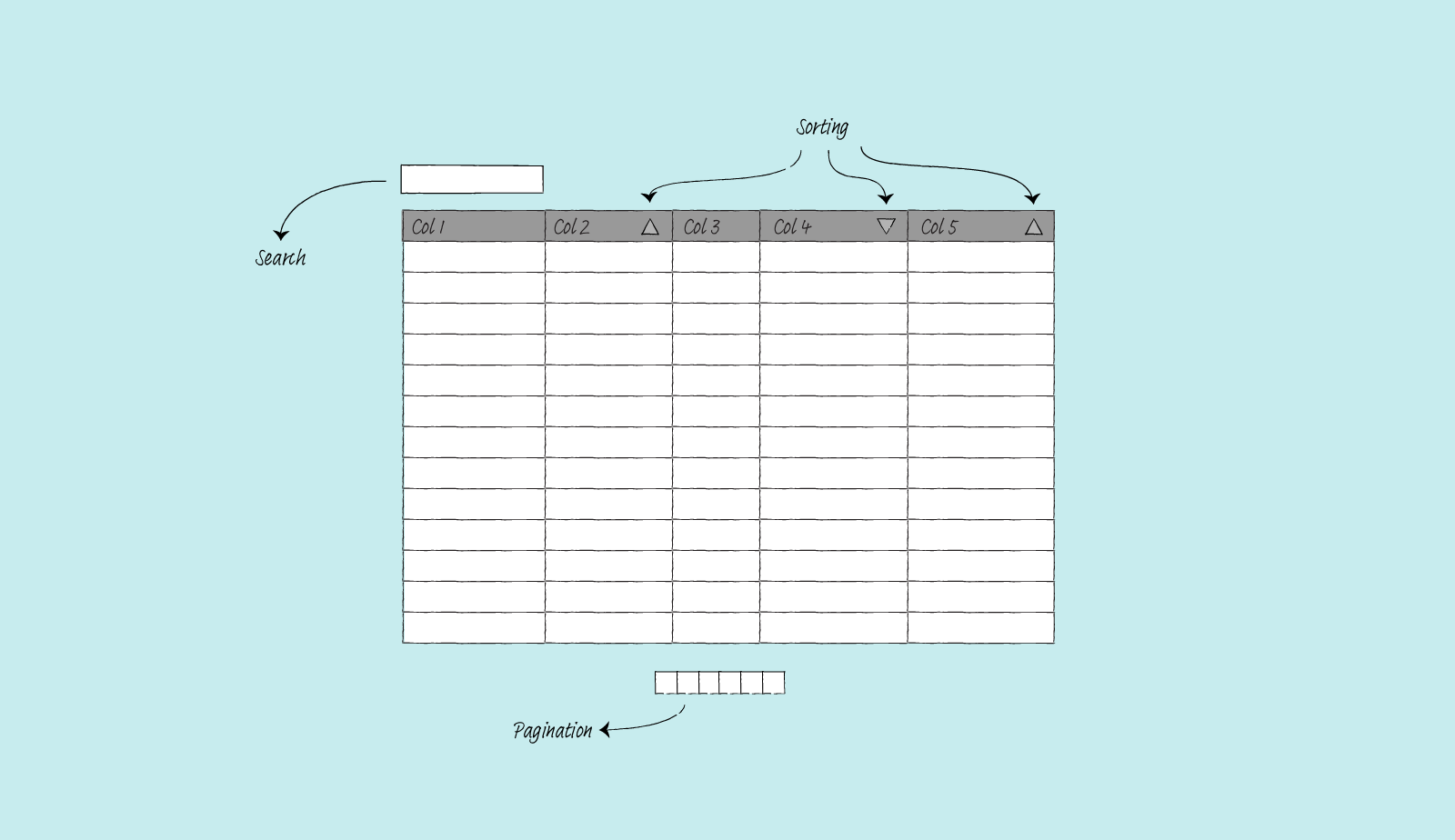
I assume you are already familiar with Django and can set up a Django project on your own. So I will not go through setting up a Django project from scratch. Let's get started.
The packages used for this project
- htmx.
htmxis a small Javascript that helps you avoid Javascript. Javascript fatigue is real. There are too many Javascript front-end frameworks, tools, and options. Integrating some of this framework into a Django project brings a lot of complexity. You will need to context switch between Python and Javascript. You also need to understand a broad set of tools likenode,npm,webpack, etc.htmxlets Django developer sticks to what Django is good at: the server-side stuff. - django-tables2. You can implement an HTML table using just Django, but there is a way to create and manage tables easily:
django-tables2. This Django app lets you define tables like you define Django models. It can automatically generate a table based on a Django model. It supports pagination, column-based table sorting, custom column functionality via subclassing, and many other features. - django-filter. I use this package for the search functionality. It has API that is similar to Django's
ModelFormand works well withdjango-tables2. - django-htmx. For
htmxto work, Djangoviewneeds to be able to tell which request is made usinghtmxand which is not. You can make your middleware or a class that your view can inherit to handle this. But for this project, I usedjango-htmxbecause why reinvent the wheel. It has a middleware that addshtmxattribute to arequestobject.
How htmx works
Before we move on, let's talk about how htmx works. The htmx library gives you access to AJAX. In vanilla HTML, only <a> and <form> can make HTTP requests, and only click and submit events can trigger them. Furthermore, an HTTP requests will always replace the entire screen. But the htmx library has overcome all these limitations. You can initiate HTTP requests on any element you want. And it is straightforward to do, example (taken straight from the htmx page):
  <!-- Load from unpkg -->
  <script src="https://unpkg.com/htmx.org@1.7.0"></script>
  <!-- have a button POST a click via AJAX -->
  <button hx-post="/clicked" hx-swap="outerHTML">
    Click Me
  </button>
When you click on the button, htmx will issue an AJAX request to /clicked, and replace the entire button with the HTML response.
I can use the same mechanics for a table. All I need to do:
- Render the whole page with the first page of the table
- When you trigger any action (sort, search, go to a specific page), it will issue an AJAX request to the server
- Server returns HTML response (partial HTML, only the table data)
- Designated section content gets replaced with the new HTML response
For this project, I use several htmx attributes, they are:
hx-get. To issue a GET request to a given URL.hx-trigger. The way to trigger the request.hx-target. To load the result into a target element.hx-swap. To swap the HTML returned into the DOM method.hx-indicator. Let the user know that something is happening since the browser will not give them any feedback.
The model
First, let's create a simple product table. I will make a table out of the following model.
# products/models.py
from django.db import models

class Product(models.Model):
    class Status(models.IntegerChoices):
        ACTIVE = 1, "Active"
        INACTIVE = 2, "Inactive"
        ARCHIVED = 3, "Archived"

    name = models.CharField(max_length=255)
    category = models.CharField(max_length=255)
    price = models.DecimalField(max_digits=10, decimal_places=2)
    cost = models.DecimalField(max_digits=10, decimal_places=2)
    status = models.PositiveSmallIntegerField(choices=Status.choices)

    def __str__(self):
        return self.name
The table
I will now define a table and specify the template. This template override is necessary because I need to add some htmx attributes to some elements. My table definition looks like the following.
# products/tables.py
import django_tables2 as tables
from products.models import Product

class ProductHTMxTable(tables.Table):
    class Meta:
        model = Product
        template_name = "tables/bootstrap_htmx.html"
Inside the bootstrap_htmx.html template, I extend the original bootstrap4.html template. The parts that I extend are the table headers (used for sorting) and the pagination part. Notice that the hx-target points to div.table-container. This is because the bootstrap4.html template has a div container that wraps the table and the class for the container is table-container. The htmx will swap the data of div.table-container with the response from the server.
{# templates/tables/bootstrap_htmx.html #}
{% extends "django_tables2/bootstrap4.html" %}
{% load django_tables2 %}
{% load i18n %}
{% block table.thead %}
{% if table.show_header %}
<thead {{ table.attrs.thead.as_html }}>
<tr>
{% for column in table.columns %}
<th {{ column.attrs.th.as_html }}
hx-get="{% querystring table.prefixed_order_by_field=column.order_by_alias.next %}"
hx-trigger="click"
hx-target="div.table-container"
hx-swap="outerHTML"
hx-indicator=".progress"
style="cursor: pointer;">
{{ column.header }}
</th>
{% endfor %}
</tr>
</thead>
{% endif %}
{% endblock table.thead %}
{# Pagination block overrides #}
{% block pagination.previous %}
<li class="previous page-item">
<div hx-get="{% querystring table.prefixed_page_field=table.page.previous_page_number %}"
hx-trigger="click"
hx-target="div.table-container"
hx-swap="outerHTML"
hx-indicator=".progress"
class="page-link">
<span aria-hidden="true">«</span>
{% trans 'previous' %}
</div>
</li>
{% endblock pagination.previous %}
{% block pagination.range %}
{% for p in table.page|table_page_range:table.paginator %}
<li class="page-item{% if table.page.number == p %} active{% endif %}">
<div class="page-link"
{% if p != '...' %}hx-get="{% querystring table.prefixed_page_field=p %}"{% endif %}
hx-trigger="click"
hx-target="div.table-container"
hx-swap="outerHTML"
hx-indicator=".progress">
{{ p }}
</div>
</li>
{% endfor %}
{% endblock pagination.range %}
{% block pagination.next %}
<li class="next page-item">
<div hx-get="{% querystring table.prefixed_page_field=table.page.next_page_number %}"
hx-trigger="click"
hx-target="div.table-container"
hx-swap="outerHTML"
hx-indicator=".progress"
class="page-link">
{% trans 'next' %}
<span aria-hidden="true">»</span>
</div>
</li>
{% endblock pagination.next %}
The filter
For adding filtering and searching on a django-tables2 table, I will use django-filter. The following is the filter definition.
# products/filters.py
from decimal import Decimal
from django.db.models import Q
import django_filters
from products.models import Product

class ProductFilter(django_filters.FilterSet):
    query = django_filters.CharFilter(method='universal_search',
                                      label="")

    class Meta:
        model = Product
        fields = ['query']

    def universal_search(self, queryset, name, value):
        if value.replace(".", "", 1).isdigit():
            value = Decimal(value)
            return Product.objects.filter(
                Q(price=value) | Q(cost=value)
            )

        return Product.objects.filter(
            Q(name__icontains=value) | Q(category__icontains=value)
        )
Since there is only a single search form for the entire table, I first check if the input data is a digit. If it is, only search for columns price and cost. Otherwise, search in columns name and category.
The view
The view will send out a full page when the request is not made by htmx and send partial results when the request is made by htmx.
# products/views.py
from django_tables2 import SingleTableMixin
from django_filters.views import FilterView

from products.models import Product
from products.tables import ProductHTMxTable
from products.filters import ProductFilter

class ProductHTMxTableView(SingleTableMixin, FilterView):
    table_class = ProductHTMxTable
    queryset = Product.objects.all()
    filterset_class = ProductFilter
    paginate_by = 15

    def get_template_names(self):
        if self.request.htmx:
            template_name = "product_table_partial.html"
        else:
            template_name = "product_table_htmx.html"

        return template_name
The template for product_table_htmx.html will render the entire page complete with the HTML header. The render_table template tag will generate the table according to our tables/bootstrap_htmx.html template.
{# product/templates/product_table_htmx.html #}
{% extends "base.html" %}

{% load render_table from django_tables2 %}
{% load i18n %}
{% load crispy_forms_tags %}

{% block main %}
    <h1>Product table</h1>

    {# Search form #}
    <form hx-get="{% url 'product_htmx' %}"
          hx-target="div.table-container"
          hx-swap="outerHTML"
          hx-indicator=".progress"
          class="form-inline">
        {% crispy filter.form %}
    </form>

    {# Progress indicator #}
    <div class="progress">
        <div class="indeterminate"></div>
    </div>

    {# The actual table #}
    {% render_table table %}
{% endblock %}
The template for product_table_partial.html will render only the table part. It will return only the table container part and the table itself. Notice we do not extend from the base.html.
{# product/templates/product_table_partial.html #}
{% load render_table from django_tables2 %}

{% render_table table %}
Style
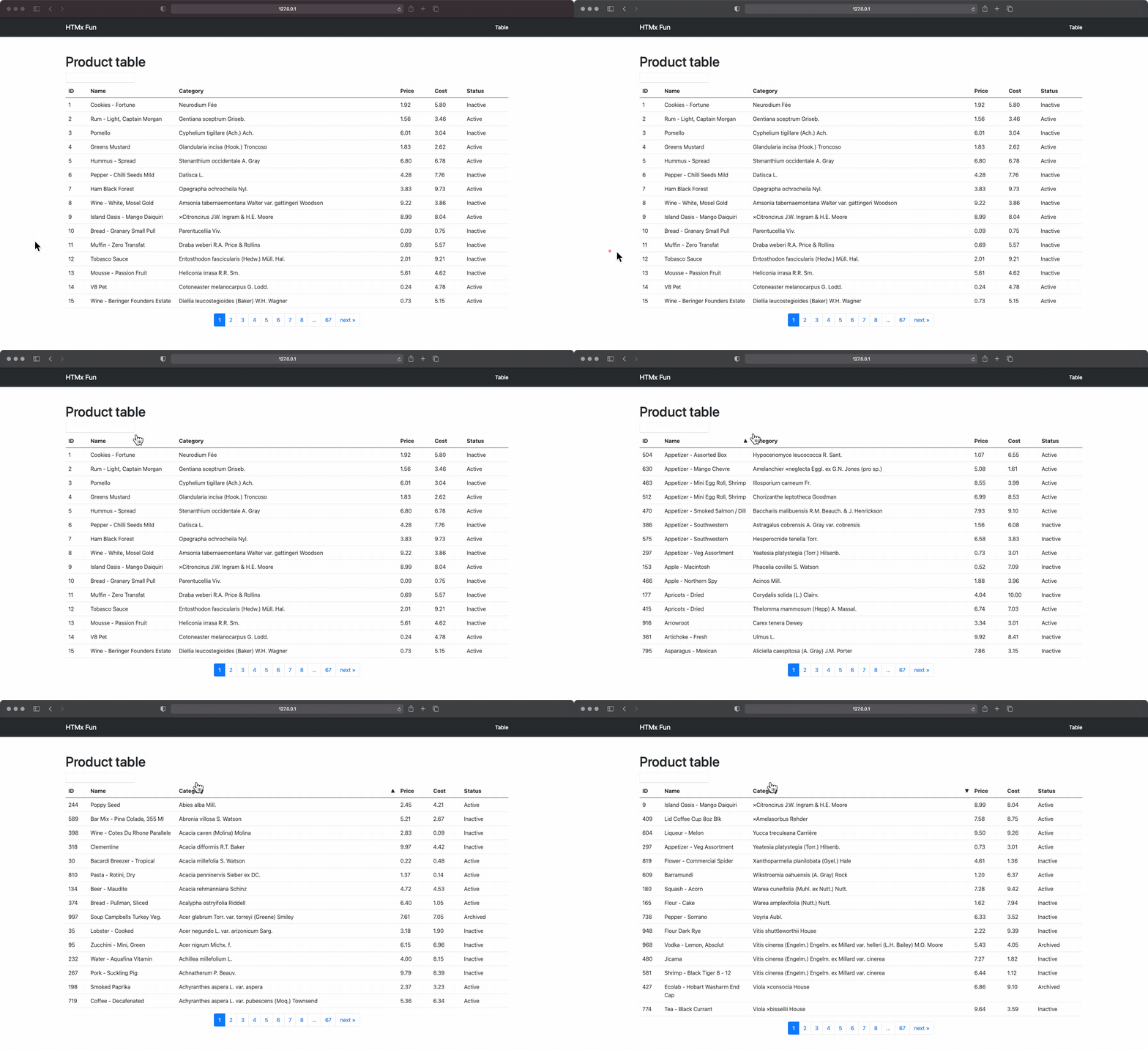
The table we define already uses Bootstrap 4 table styling. But I need to add some style so I can see an arrow on the right of the column when I perform sorting on a column. The arrow will point up or down depending on whether the sort is ascending or descending. Also I need to specify the width of the column, otherwise the column will change size during sorting or searching. After that I only need to add styling for the progress indicator.
/* Table style */
.table-container th.asc:after {
    content: '\0000a0\0025b2';
    float: right;
}

.table-container th.desc:after {
    content: '\0000a0\0025bc';
    float: right;
}

.table-container table td:nth-child(1) {
    width: 5%;
}

.table-container table td:nth-child(2) {
    width: 20%;
}

.table-container table td:nth-child(3) {
    width: 50%;
}

/* Progress bar */
.progress {
    height: 4px;
    width: 100%;
    border-radius: 2px;
    background-clip: padding-box;
    overflow: hidden;
    position: relative;
}

.progress {
    opacity: 0;
}

.htmx-request .progress {
    opacity: 1;
}
.htmx-request.progress {
    opacity: 1;
}

.progress .indeterminate {
    background-color: blue;
}

.progress .indeterminate:before {
    content: '';
    position: absolute;
    background-color: inherit;
    top: 0;
    left: 0;
    bottom: 0;
    will-change: left, right;
    -webkit-animation: indeterminate 2.1s cubic-bezier(0.65, 0.815, 0.735, 0.395) infinite;
    animation: indeterminate 2.1s cubic-bezier(0.65, 0.815, 0.735, 0.395) infinite;
}
.progress .indeterminate:after {
    content: '';
    position: absolute;
    background-color: inherit;
    top: 0;
    left: 0;
    bottom: 0;
    will-change: left, right;
    -webkit-animation: indeterminate-short 2.1s cubic-bezier(0.165, 0.84, 0.44, 1) infinite;
    animation: indeterminate-short 2.1s cubic-bezier(0.165, 0.84, 0.44, 1) infinite;
    -webkit-animation-delay: 1.15s;
    animation-delay: 1.15s;
}

@keyframes indeterminate {
    0% {
        left: -35%;
        right: 100%;
    }
    60% {
        left: 100%;
        right: -90%;
    }
    100% {
        left: 100%;
        right: -90%;
    }
}

@keyframes indeterminate-short {
    0% {
        left: -200%;
        right: 100%;
    }
    60% {
        left: 107%;
        right: -8%;
    }
    100% {
        left: 107%;
        right: -8%;
    }
}
The result
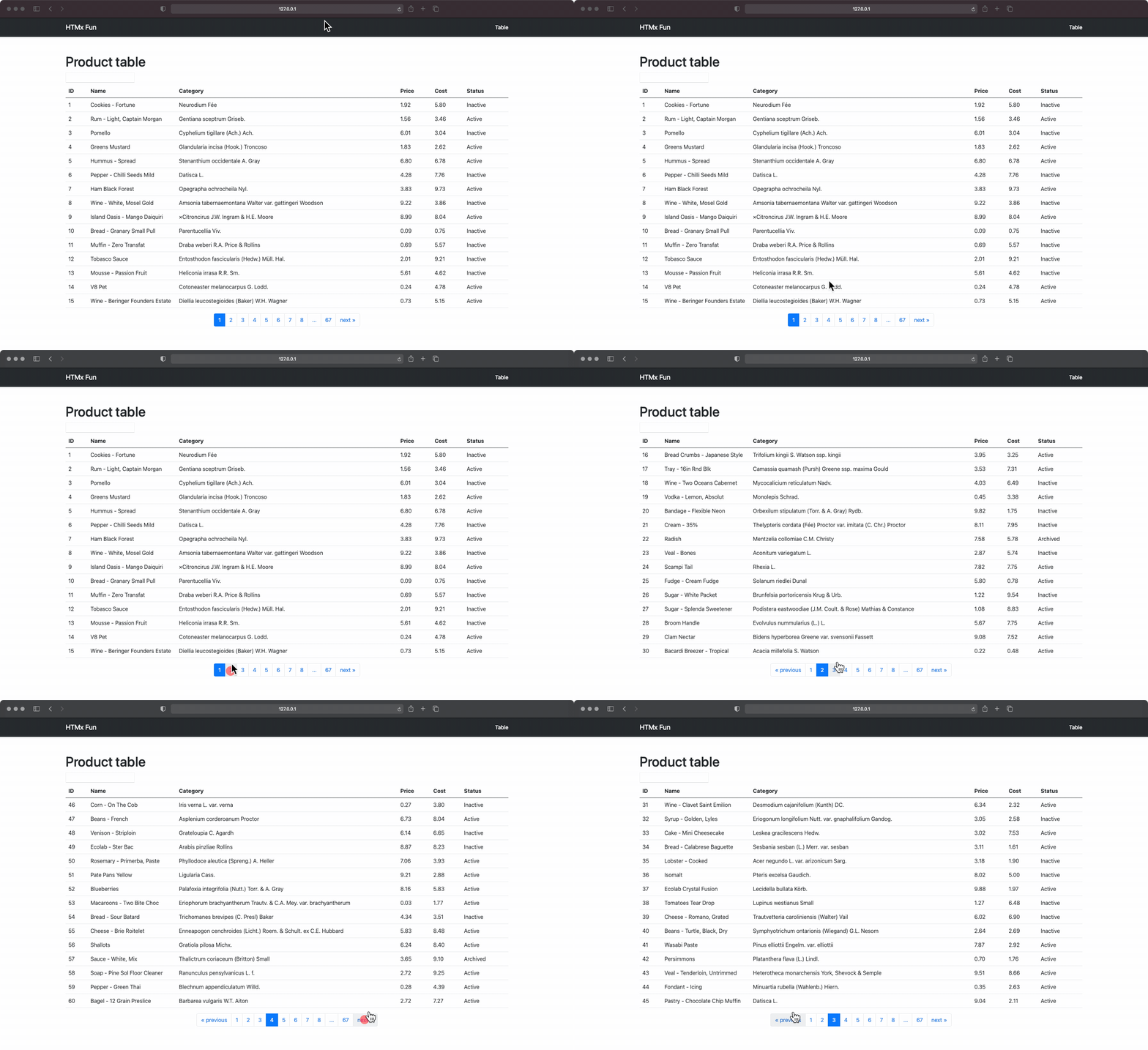
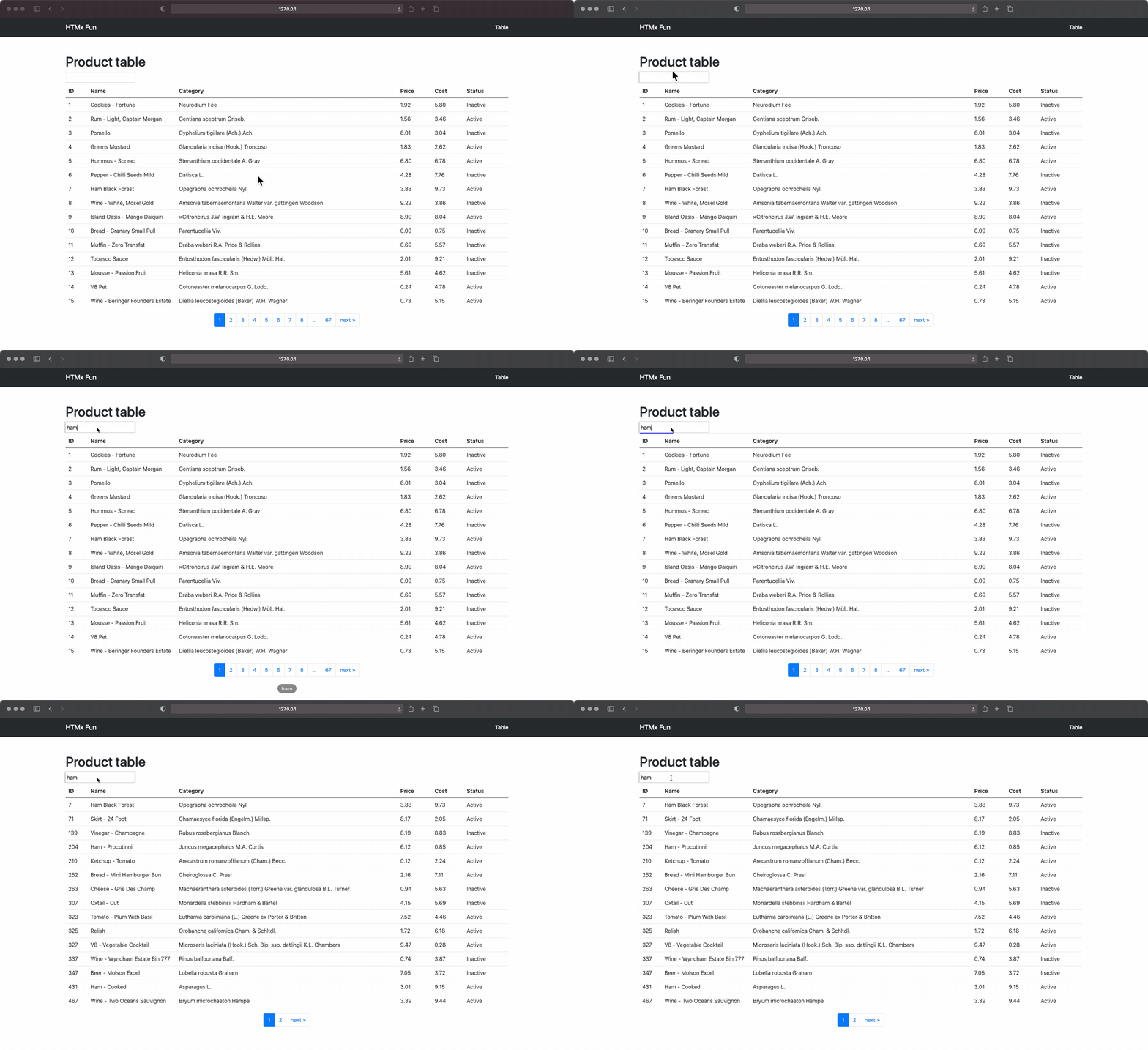
So now I have a working table that looks like this.
Sorting
Pagination
Searching
Summary
In this article, I have shown why you should take a step back in frontend development and carefully weigh the pros and cons of introducing a Javascript framework into a Django project. I have shown you how to use htmx with django-tables to create a responsive and functional table, so you can keep the frontend light and lean.
Comments
Join the discussionGreat article, thanks for that, really helpful! One thing to mention: Won't the search reset the ordering of the columns? Do you have any elegant ideas on how to solve this? I tried adding hx-push-url="true" to the column ordering htmx which kind of works but doesn't seem perfect to me.
Thanks for this very helpful explanation.
Hello Joash Xu Your article is awosome. Is it possible to share detailed contents regarding base.html, views.py etc.
I'm trying to make the similier table, but, It's not working to see table at the moment.
I appreciate if you share whole files if possible.
You can look at the structure and code at the following GitHub repo: github.com/joashxu/dj-htmx-fun.
Hope it helps.
Awesome post, thank you! A perfect integration of htmx, django-filter and django-tables.
With some minor changes also infinite scroll is possible:
Add a template rendering the table rows with the last row triggering the loading of more rows (google htmx infinite-scroll. I cant post links here???) . Add url parameter lazy=1 in hx-get to flag infinite scroll request:
{# templates/bootstrap_htmx_rows.html #}
{% load django_tables2 %}
{% load i18n %}
{% for row in table.paginated_rows %}
    {% with lastrow=forloop.last %}
      {% block table.tbody.row %}
      <tr {{ row.attrs.as_html }} {% if lastrow and table.page.has_next %}hx-get="{% querystring table.prefixed_page_field=table.page.next_page_number "lazy"="1" %}" hx-trigger="revealed" hx-swap="afterend"{% endif %}>
          {% for column, cell in row.items %}
              <td {{ column.attrs.td.as_html }}>{% if column.localize == None %}{{ cell }}{% else %}{% if column.localize %}{{ cell|localize }}{% else %}{{ cell|unlocalize }}{% endif %}{% endif %}</td>
          {% endfor %}
      </tr>
      {% endblock table.tbody.row %}
    {% endwith %}
{% empty %}
    {% if table.empty_text %}
    {% block table.tbody.empty_text %}
        <tr><td colspan="{{ table.columns|length }}">{{ table.empty_text }}</td></tr>
    {% endblock table.tbody.empty_text %}
    {% endif %}
{% endfor %}
Override the table.tbody block in bootstrap_htmx.html and make use of the row rednering template (plus clear pagination blocks):
{% block table.tbody %}
    <tbody {{ table.attrs.tbody.as_html }}>
      {% include 'bootstrap_tables_htmx_rows.html' %}
    </tbody>
{% endblock table.tbody %}

{% block pagination.previous %}
{% endblock pagination.previous %}

{% block pagination.range %}
{% endblock pagination.range %}

{% block pagination.next %}
{% endblock pagination.next %}
In view check if htmx request is due to infinite scroll (lazy in request.GET) then only render rows. If htmx request is due to filter/sort update the render full table.
    def get_template_names(self):
        if self.request.htmx:
            if "lazy" in self.request.GET:
                # Render only rows
                template_name = "bootstrap_tables_htmx_rows.html"
            else:
                # Render Full table
                template_name = "product_table_partial.html"
        else:
            # Render full page
            template_name = "product_table_htmx.html"

        return template_name
Dear Joash Xu, Thank you! But, may I request you 2 things? folder structure of this project & syntax used to call the stylesheet inside html files? Also, 'product_htmx' inside ""- hx-get="{% url 'product_htmx' %}" "", is it right term?
I am completely new to application development and trying to develop data entry web app using django. I tried to make your solution run without any error, but the page is appearing blank rendering nothing. So need help.
Hi Meera,
You can look at the structure and code at the following GitHub repo: https://github.com/joashxu/dj-htmx-fun.
Hope it helps.
Joash Xu Yes Joash Xu. Thank you very much! Able to reproduce now and getting the page working :)


